
You arrive home with groceries in both hands, the dog barking inside, and your phone buzzing with a delivery notification — and suddenly you’re wondering whether your smart lock should talk to your phone directly or route everything through your home network. That small decision shapes how your front door behaves every single day. The good news is that choosing between WiFi vs Bluetooth locks becomes much simpler once you understand how each technology actually works inside a real home. Keep reading, because we’re walking you through everything our team at Budget Locksmith of Tucson has learned from installing hundreds of smart locks across Tucson neighborhoods.
Understanding the Core Difference Between WiFi vs Bluetooth Locks
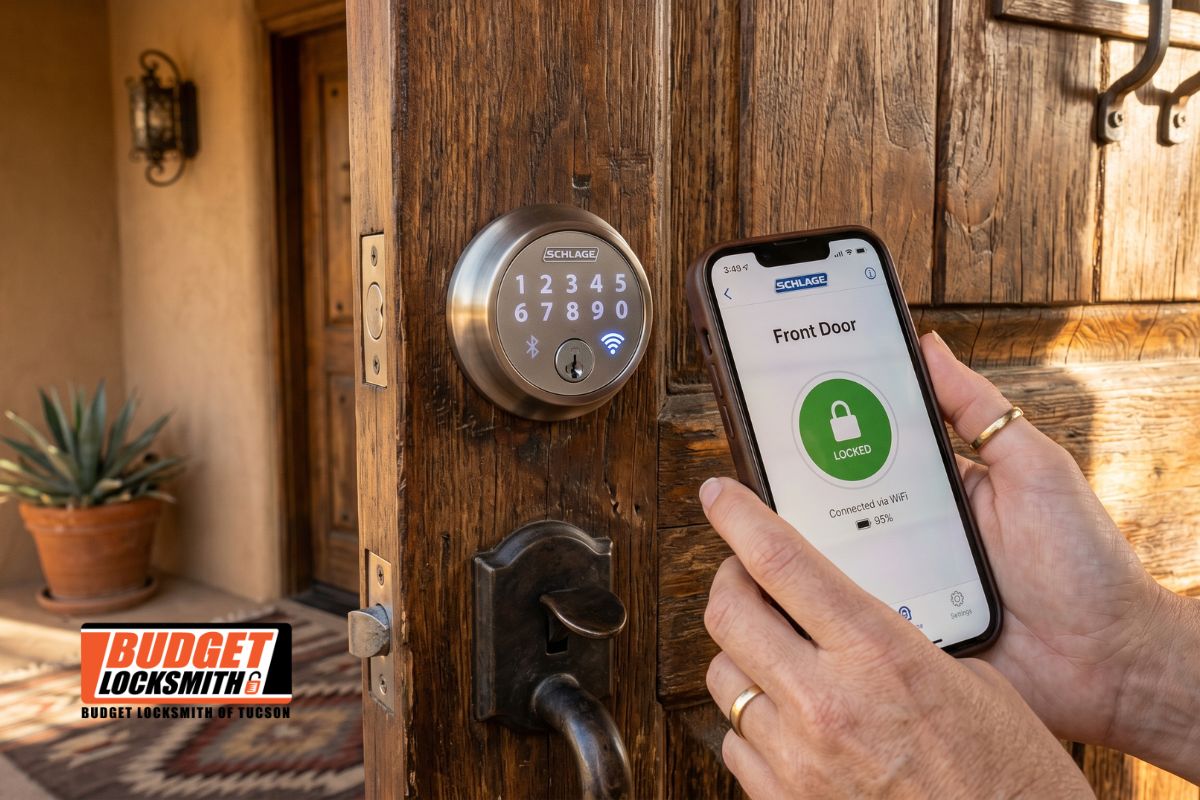
At the most basic level, a Bluetooth smart lock communicates directly with your phone using a short-range wireless signal, typically within 30 to 40 feet. A WiFi smart lock, on the other hand, connects to your home router, which means you can control it from anywhere in the world as long as both devices have internet access. Both options fall under the broader umbrella of connected home safety solutions, but they behave very differently once installed on your front door.
After more than a decade of hands-on work as a professional locksmith team serving Tucson, we’ve noticed that most homeowners don’t actually need help choosing a brand — they need help understanding which connectivity style matches their lifestyle. That’s where we come in. Our certified technicians at Budget Locksmith of Tucson evaluate your door type, existing deadbolt, router placement, and daily habits before recommending any hardware.
| Feature | Bluetooth Smart Lock | WiFi Smart Lock |
|---|---|---|
| Connection Range | Up to 40 feet from device | Anywhere with internet access |
| Battery Usage | Lower consumption | Higher consumption |
| Remote Access | Not available without a bridge | Fully available |
| Setup Complexity | Simple pairing process | Requires router configuration |
| Smart Home Integration | Limited to nearby devices | Alexa, Google Home, Apple HomeKit |
| Guest Access Management | In-person or nearby only | Grant or revoke from anywhere |
| Security Encryption | AES 128-bit standard | AES 128/256-bit + TLS |
| Best For | Renters, small homes, minimalists | Families, frequent travelers, smart homes |
Why Bluetooth Smart Locks Still Matter for Many Tucson Homeowners
Bluetooth locks often get dismissed as the “older” option, but our team frequently installs them for good reason. They’re lightweight on power, extremely private, and genuinely straightforward to operate. Because the lock only communicates when your phone is physically near it, there’s no constant wireless chatter traveling across your home network. For homeowners who feel cautious about internet-connected devices, this closed-loop approach offers real comfort.
Ideal Situations for Bluetooth Connectivity
We typically recommend Bluetooth smart locks for renters, small condos, casita units, and homes where the primary user is almost always present. If you rarely leave town and prefer a clean, local experience, a Bluetooth-only lock paired with a quality deadbolt security setup performs beautifully. Our residential locksmith services team has installed these in historic districts like Armory Park and Sam Hughes, where homeowners want modern convenience without over-engineering their entryways.
Limitations Worth Knowing
The main trade-off is remote access. If your teenager forgets their key at a friend’s house across town, a Bluetooth-only lock won’t let you open the door from your phone. Some brands solve this with an optional WiFi bridge, but at that point you’re essentially building a hybrid system. Our mobile locksmith technicians can walk you through whether adding a bridge makes sense or whether a native WiFi lock would serve you better from day one.
Why WiFi Smart Locks Have Become the Tucson Favorite
In our day-to-day installations across Tucson neighborhoods, WiFi smart locks have quietly become the most requested upgrade. The reason is simple: modern families juggle work schedules, Airbnb guests, dog walkers, house cleaners, and delivery drivers, and everyone expects access management to happen from a phone screen. Our emergency locksmith team sees firsthand how a WiFi-connected lock prevents lockout situations that used to require a service call.
Remote Access and Real-World Flexibility
With a WiFi lock, you can unlock the door for a trusted neighbor while you’re at work downtown, receive a notification when your kids arrive home from school, or generate a temporary code for a cleaning service that expires automatically. Our lock installation specialists often pair these units with existing smart home ecosystems so the front door becomes part of a larger automation routine — lights turning on, thermostat adjusting, and the home safety camera recording the moment the door opens.
Where WiFi Locks Need Extra Planning
WiFi locks consume more battery because they maintain a persistent connection, so we always verify your router placement before installation. If your entry door sits far from the router, we may suggest a mesh network extension or a slightly different lock model. This is where working with a certified locksmith with real field experience matters more than reading online reviews.
Security Considerations Our Technicians Always Address
Both technologies use strong encryption, and we don’t want anyone to feel that one is inherently unsafe. However, physical security still starts at the door itself. A beautiful smart lock mounted on a weak strike plate is still a weak door. Our certified team inspects the door frame, hinges, and existing deadbolt security hardware before any smart upgrade. We often reinforce strike plates with longer screws and recommend pairing the smart lock with a quality thumbturn lock on the interior side for added control.
We also educate every customer about firmware updates, strong app passwords, and two-factor authentication on their smart home accounts. These small habits protect your investment far more than any single hardware feature. Our commercial locksmith division applies the same principles to small businesses across Tucson that rely on connected access control.
Pro Tip From Our Field Technicians
When installing any smart lock, always keep a traditional mechanical key backup stored somewhere secure outside your home — with a trusted family member, for example. We’ve responded to countless calls where a dead battery and a forgotten phone turned a simple evening into a stressful one. A mechanical backup costs nothing extra and preserves your options. Our key duplication service can cut a high-security backup key the same day you schedule your smart lock installation.
How We Help You Choose Between WiFi and Bluetooth at Your Door
Every home we visit through Budget Locksmith of Tucson gets a short on-site assessment. We measure signal strength near the door, review your existing hardware, ask about your household’s daily rhythm, and only then recommend a specific connectivity type. Our technicians hold industry certifications and complete ongoing training on brands like Schlage, Yale, Kwikset, August, and Level, which means the recommendation is based on your door — not on which product has the flashiest marketing.
We’ve earned strong reviews across Google and local directories because we treat every installation as if it were our own front door. You can see our work and verify our reputation on our Google Business listing, where neighbors from Oro Valley, Catalina Foothills, Midtown, and the East Side have shared their experiences.
Frequently Asked Questions
Can I use a Bluetooth smart lock if I travel frequently?
We generally recommend a WiFi-enabled option for frequent travelers because it lets you manage access from anywhere. A Bluetooth-only model would require you to be near the door to grant entry to someone else.
Do WiFi smart locks drain batteries quickly in Tucson’s heat?
Tucson’s climate can affect battery performance on any electronic device. Our technicians select lock models tested for high-temperature environments and advise on lithium battery options that hold up well during summer months.
Can a smart lock replace my existing deadbolt without door modifications?
In most cases, yes. Modern smart deadbolts are designed to fit standard door preparations. Our team verifies compatibility during the consultation and handles any minor adjustments needed for a clean installation.
Are WiFi smart locks safe from hacking attempts?
Reputable brands use AES encryption and secure cloud protocols that meet industry standards. We always pair the installation with guidance on strong passwords, firmware updates, and two-factor authentication for your account.
What happens to my smart lock if the WiFi goes down?
Your keypad, physical key, and local Bluetooth features continue to work normally. Remote access simply resumes once your connection is restored, so you’re never locked out of your own home.
Do you offer installation for both Bluetooth and WiFi smart locks in Tucson?
Yes. Our certified technicians install both connectivity types across residential and commercial properties throughout the Tucson metro area, including setup, app pairing, and a walkthrough of every feature.
Choosing Connectivity That Fits Your Life, Not the Marketing
Picking between WiFi vs Bluetooth locks isn’t about finding the “best” technology — it’s about matching the connection style to the way you actually live. A musician who works from home and rarely travels may thrive with a simple Bluetooth model, while a family managing school pickups, vacation rentals, and dog-walker visits will get far more value from a WiFi-connected system. If you’ve already read our guide on bump-proof locks, you’ll notice the same philosophy applies here: the right hardware is the one that genuinely supports your routine.
Our team at Budget Locksmith of Tucson has spent more than a decade upgrading doors across the Old Pueblo, and we’d be glad to walk your home with you, evaluate your router coverage, inspect your existing deadbolt, and recommend a smart lock that makes sense for your specific entryway. Reach out through our contact page to schedule a consultation, and stop by our Google Maps listing to see recent reviews from neighbors we’ve already helped. When you’re ready to upgrade your front door with hardware that truly protects your household, call Budget Locksmith of Tucson and let our certified technicians handle every detail — visit our local Google listing today to get started.